

CKA Certification - The Ultimate Guide [Updated 2022]
CKA Practice Exam and Study Guides - Verified By DumpsActual
For more info read reference:
Linux Foundation-CKA Official Certification Site
Understanding of functional and technical aspects of Troubleshooting
Detect, diagnose, and remedy a variety of Kubernetes failures at the network, node, control-plane, and application levels. You will use tools included in Kubernetes, such as kubectl, as well as a variety of Linux operating system tools like systemctl, journalctl, ss, and openssl to build a comprehensive Kubernetes troubleshooting toolkit.
The following will be discussed in CNCF CKA dumps:
- Troubleshoot Kubernetes component failures
- Troubleshoot application failure
- Troubleshoot Kubernetes application failures
- Troubleshoot cluster component failure
- Evaluate cluster and node logging
- Troubleshoot networking
- Troubleshoot Kubernetes connection failures
- Understand how to monitor applications
- Troubleshoot Kubernetes node failures
- Manage container stdout & stderr logs
NEW QUESTION 34
Given a partially-functioning Kubernetes cluster, identify symptoms of failure on the cluster.
Determine the node, the failing service, and take actions to bring up the failed service and restore the health of the cluster. Ensure that any changes are made permanently.
You can ssh to the relevant I nodes (
[student@node-1] $ ssh <nodename
You can assume elevated privileges on any node in the cluster with the following command:
[student@nodename] $ | sudo -i
Answer:
Explanation:
See the solution below.
Explanation
solution
F:\Work\Data Entry Work\Data Entry\20200827\CKA\23 C.JPG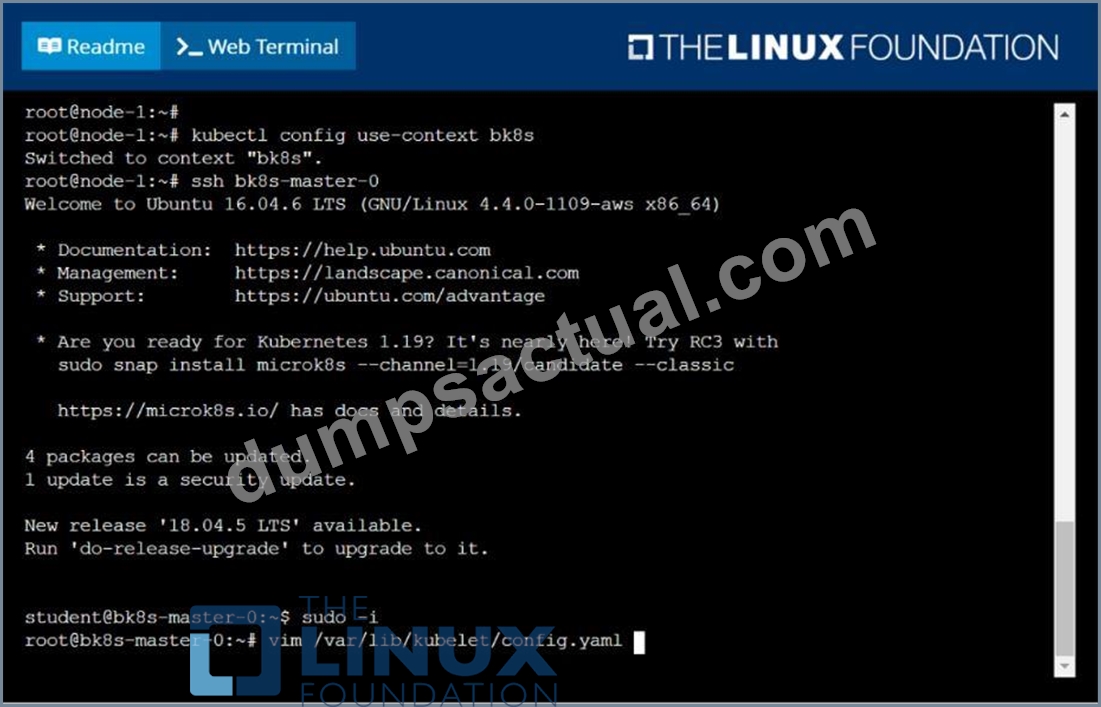
F:\Work\Data Entry Work\Data Entry\20200827\CKA\23 D.JPG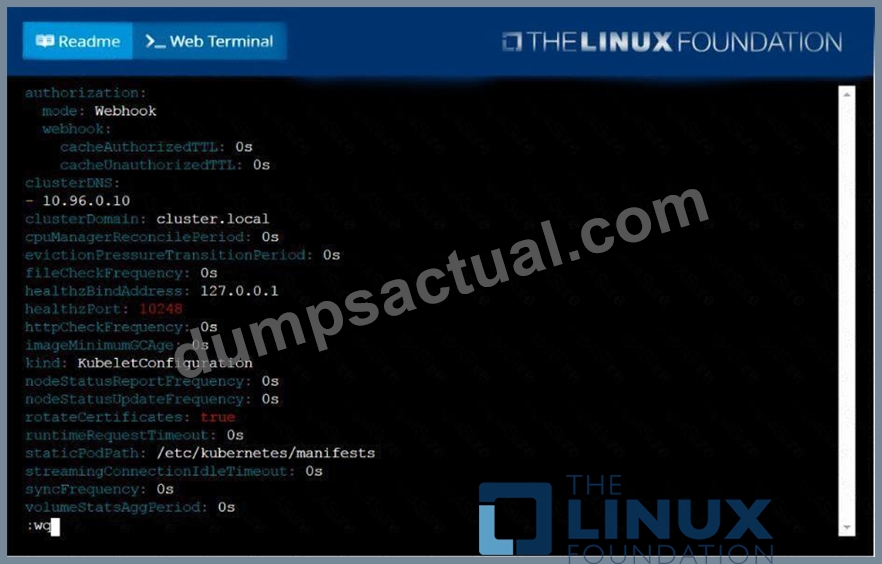
F:\Work\Data Entry Work\Data Entry\20200827\CKA\23 E.JPG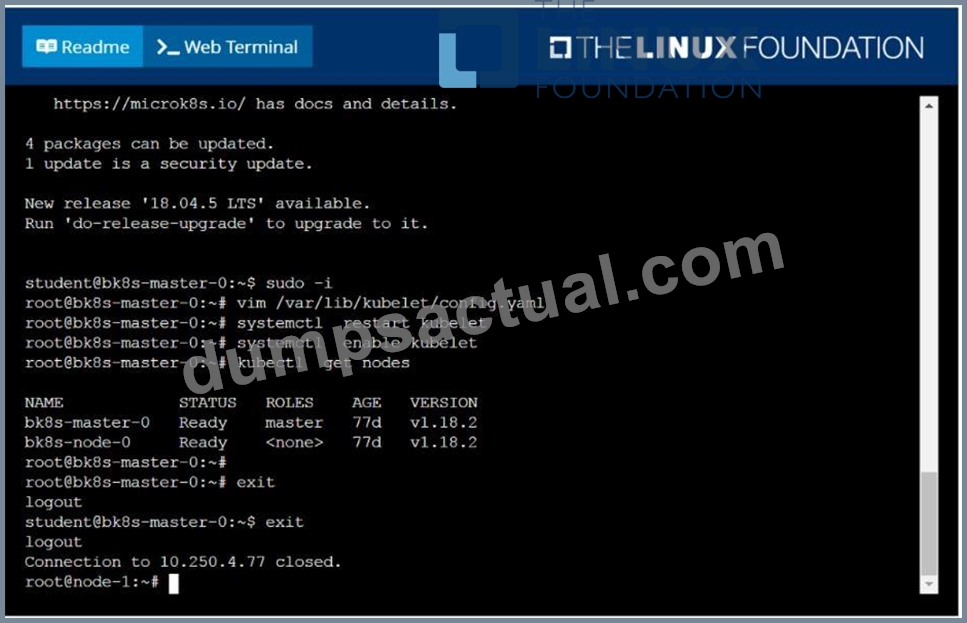
NEW QUESTION 35
Create a redis pod, and have it use a non-persistent storage
Note: In exam, you will have access to kubernetes.io site,
Refer : https://kubernetes.io/docs/tasks/configure-pod-container/configurevolume-storage/
- A. apiVersion: v1
kind: Pod
metadata:
name: redis
spec:
containers:
- name: redis
image: redis
volumeMounts:
- containerPort: 6379
volumes:
- name: redis-storage
emptyDir: {} - B. apiVersion: v1
kind: Pod
metadata:
name: redis
spec:
containers:
- name: redis
image: redis
volumeMounts:
- name: redis-storage
mountPath: /data/redis
ports:
- containerPort: 6379
volumes:
- name: redis-storage
emptyDir: {}
Answer: B
NEW QUESTION 36
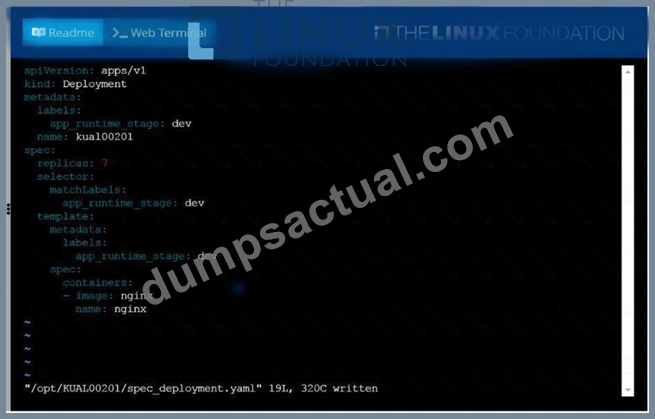
Create a deployment spec file thatwill:
* Launch 7 replicas of thenginxImage with the labelapp_runtime_stage=dev
* deployment name:kual00201
Save a copy of this spec file to/opt/KUAL00201/spec_deployment.yaml
(or/opt/KUAL00201/spec_deployment.json).
When you are done, clean up (delete)any new Kubernetes API object thatyou produced during this task.
Answer:
Explanation:
See the solution below.
Explanation
solution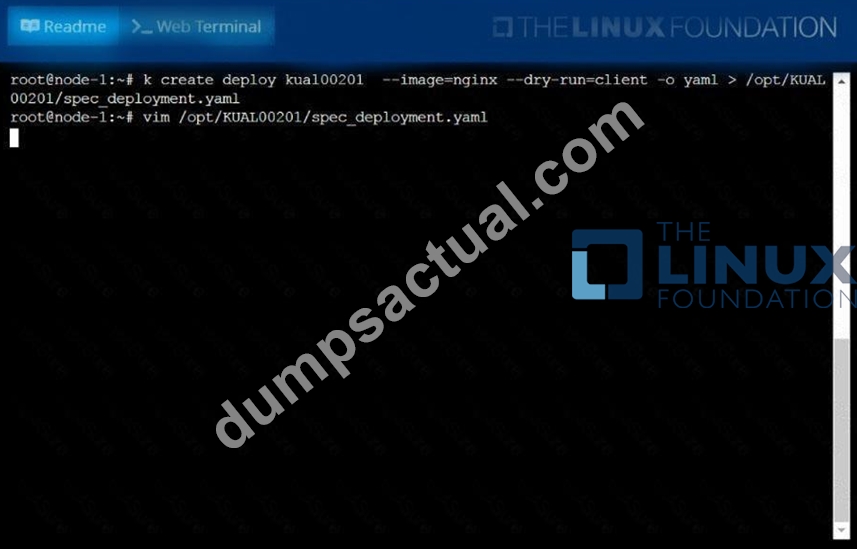
NEW QUESTION 37
List "nginx-dev" and "nginx-prod" pod and delete those pods
- A. kubect1 get pods -o wide
kubectl delete po "nginx-dev" kubectl delete po "nginx-prod" - B. kubect1 get pods -o wide
kubectl delete po "nginx-dev" kubectl delete po "nginx-prod"
Answer: A
NEW QUESTION 38
Create a Kubernetes secret as follows:
Name: super-secret
password: bob
Create a pod named pod-secrets-via-file, using the redis Image, which mounts a secret named super-secret at
/secrets.
Create a second pod named pod-secrets-via-env, using the redis Image, which exports password as CONFIDENTIAL
Answer:
Explanation:
See the solution below.
Explanation
solution
F:\Work\Data Entry Work\Data Entry\20200827\CKA\12 B.JPG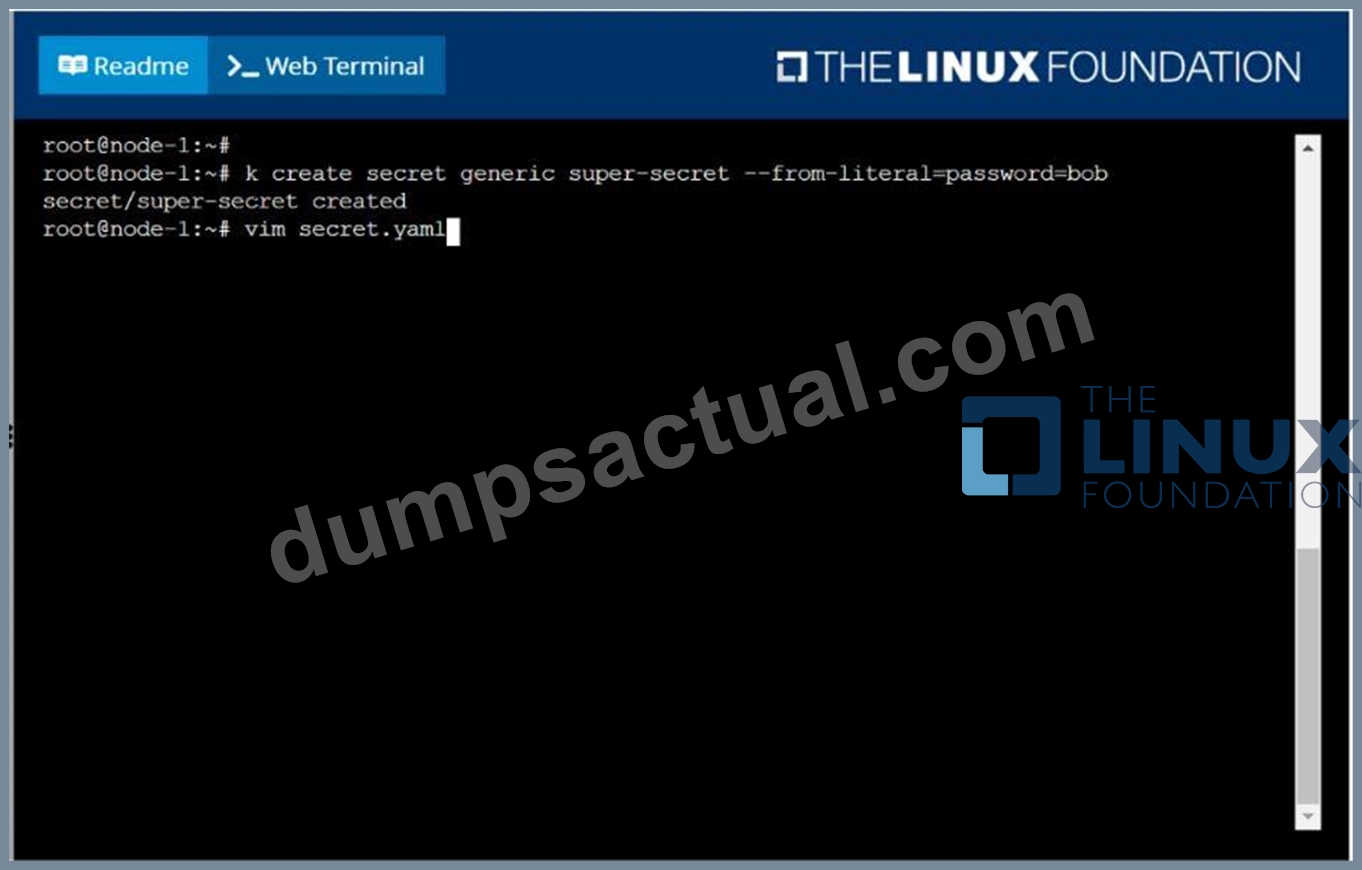
F:\Work\Data Entry Work\Data Entry\20200827\CKA\12 C.JPG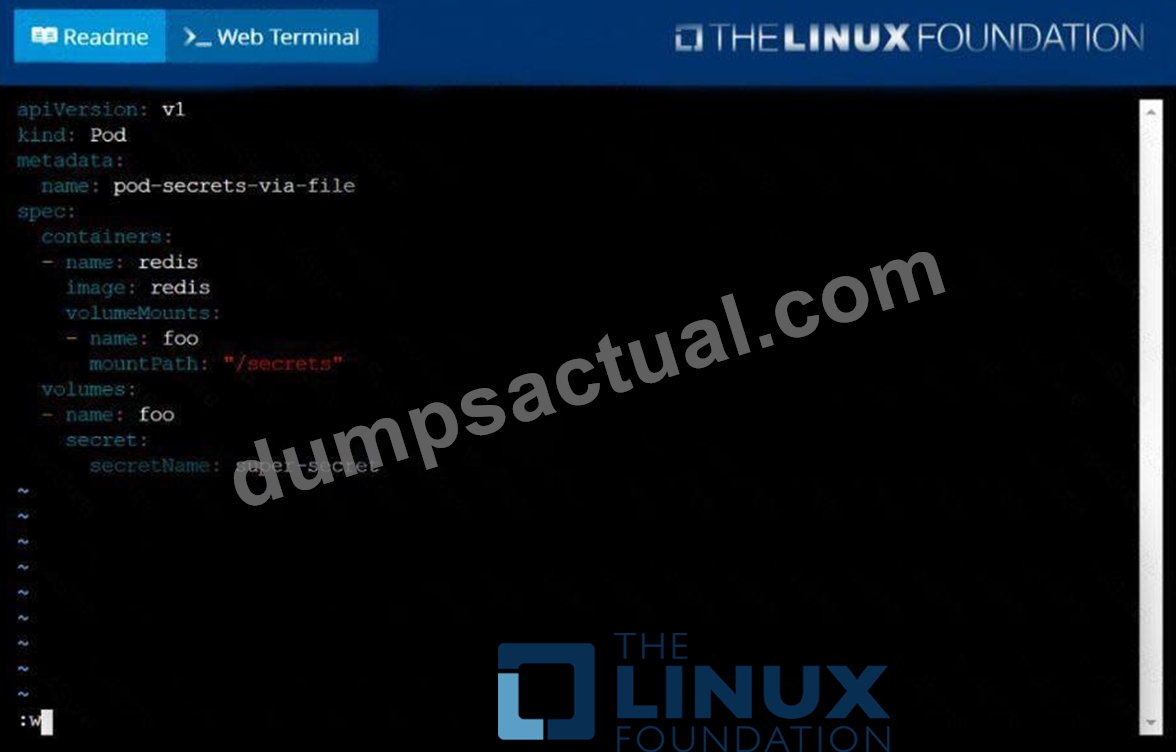
F:\Work\Data Entry Work\Data Entry\20200827\CKA\12 D.JPG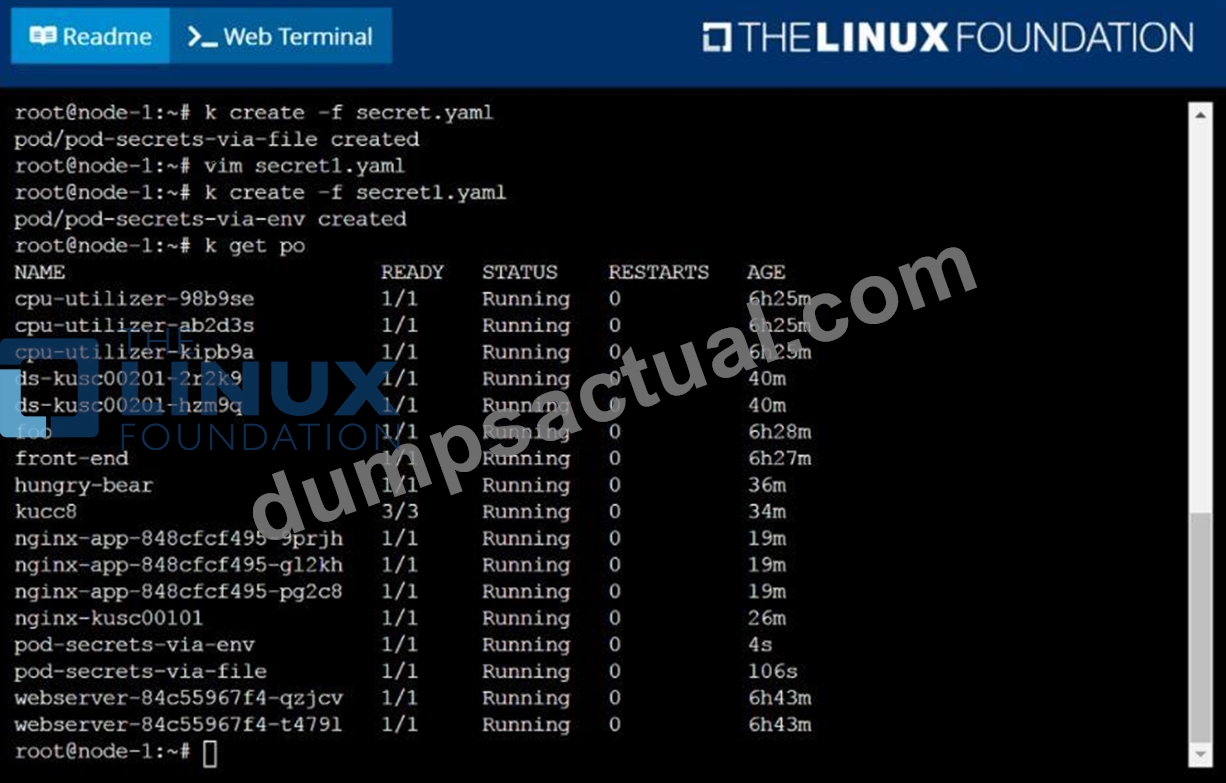
NEW QUESTION 39
Create a file:
/opt/KUCC00302/kucc00302.txt that lists all pods that implement service baz in namespace development.
The format of the file should be one pod name per line.
Answer:
Explanation:
See the solution below.
Explanation
solution
F:\Work\Data Entry Work\Data Entry\20200827\CKA\11 B.JPG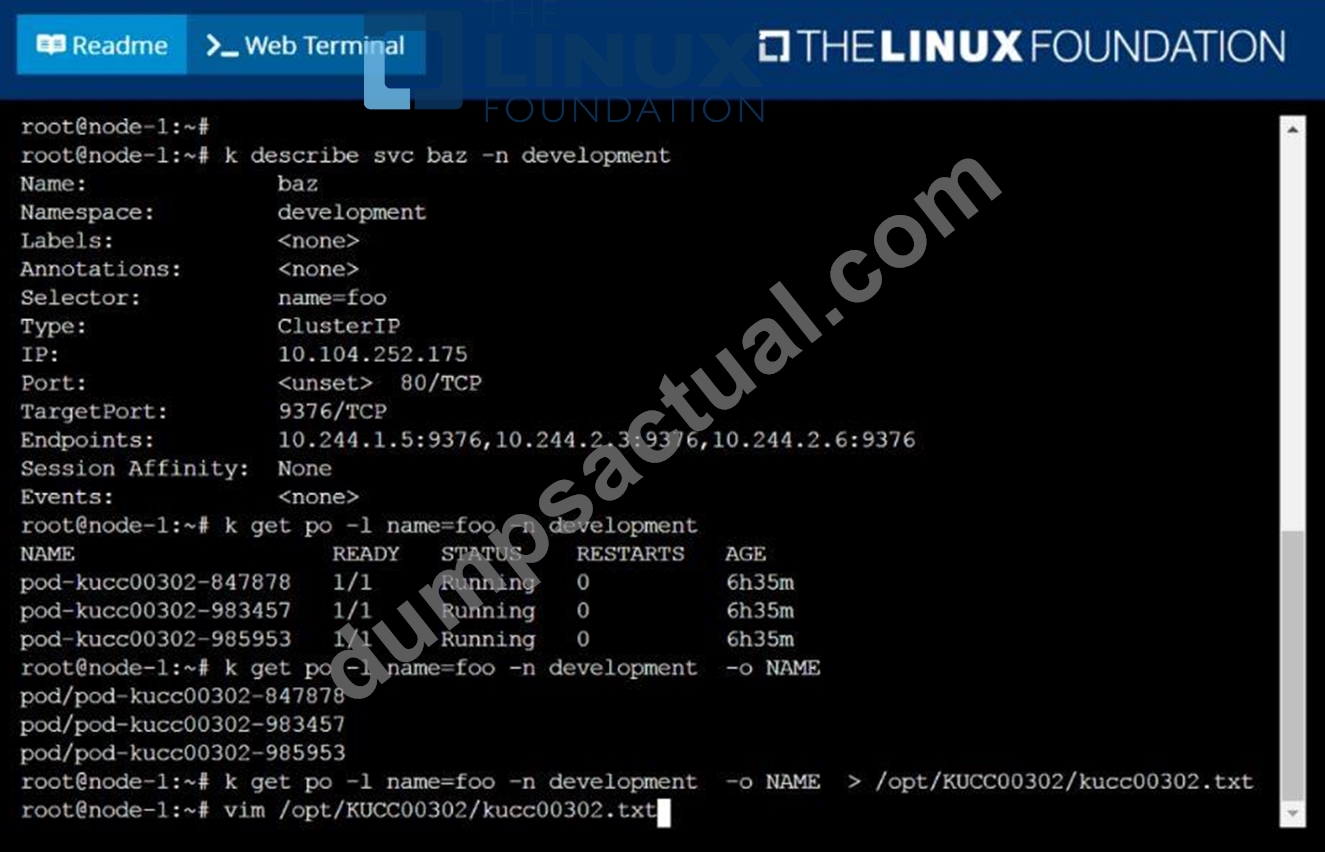
F:\Work\Data Entry Work\Data Entry\20200827\CKA\11 C.JPG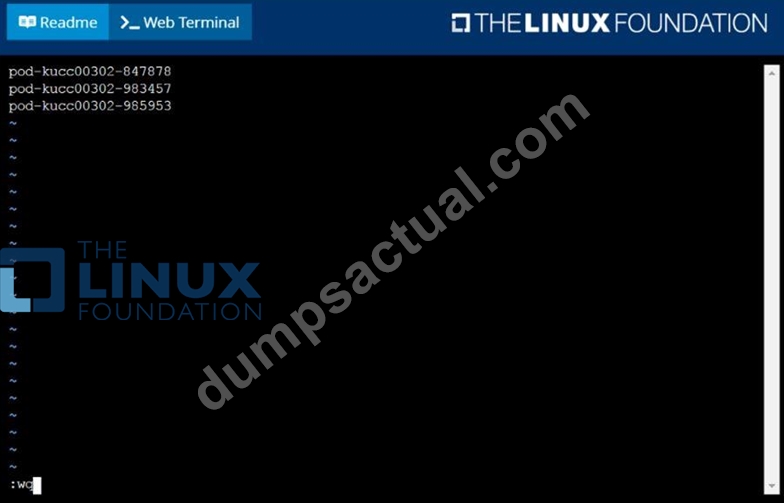
F:\Work\Data Entry Work\Data Entry\20200827\CKA\11 D.JPG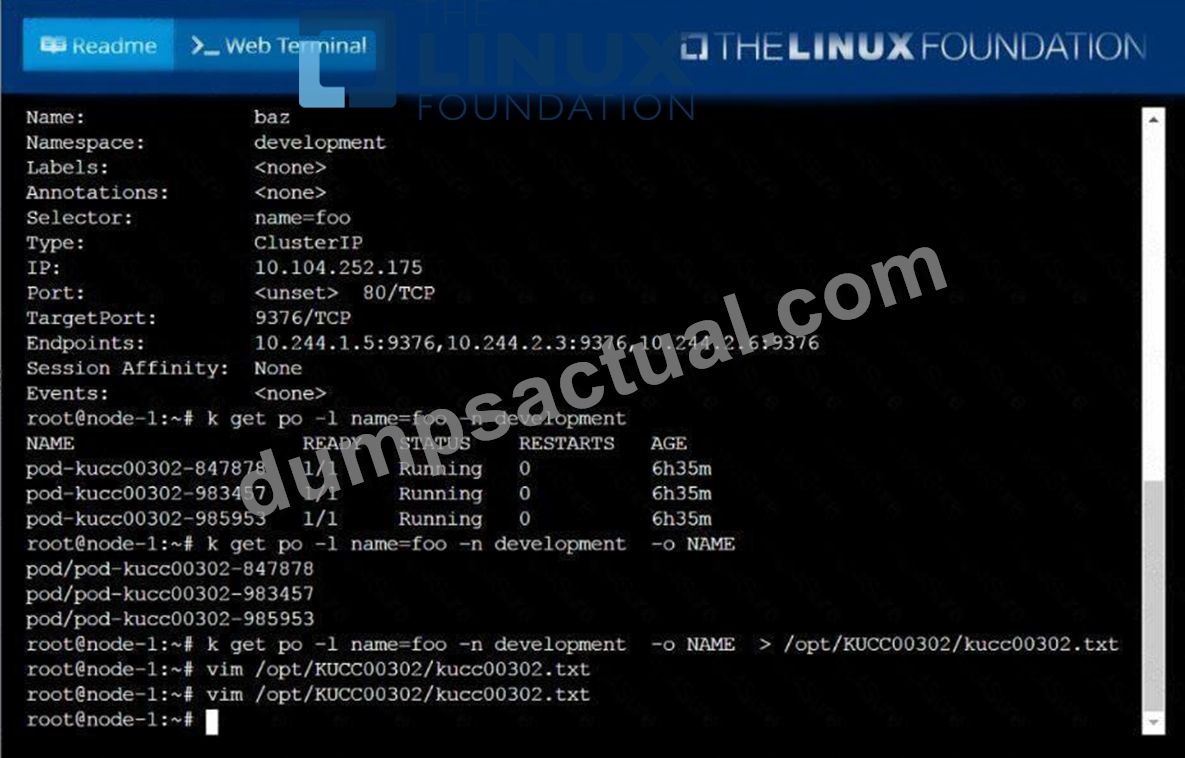
NEW QUESTION 40
Check to see how many worker nodes are ready (not including nodes taintedNoSchedule) and write the number to/opt/KUCC00104/kucc00104.txt.
Answer:
Explanation:
See the solution below.
Explanation
solution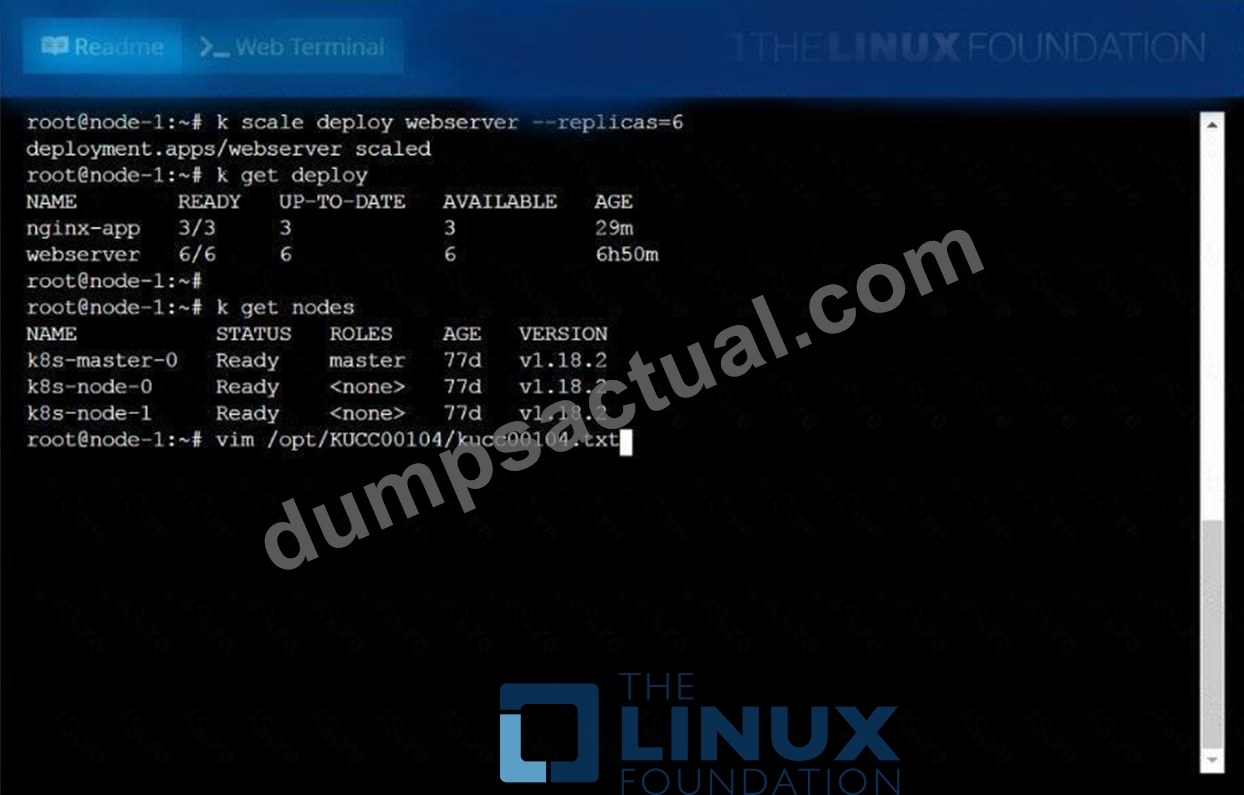
NEW QUESTION 41
Get IP address of the pod - "nginx-dev"
Answer:
Explanation:
See the solution below.
Explanation
Kubect1 get po -o wide
Using JsonPath
kubect1 get pods -o=jsonpath='{range
items[*]}{.metadata.name}{"\t"}{.status.podIP}{"\n"}{end}'
NEW QUESTION 42
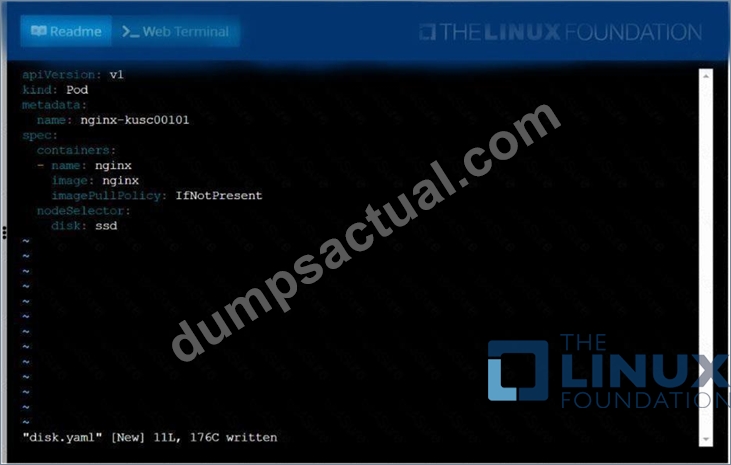
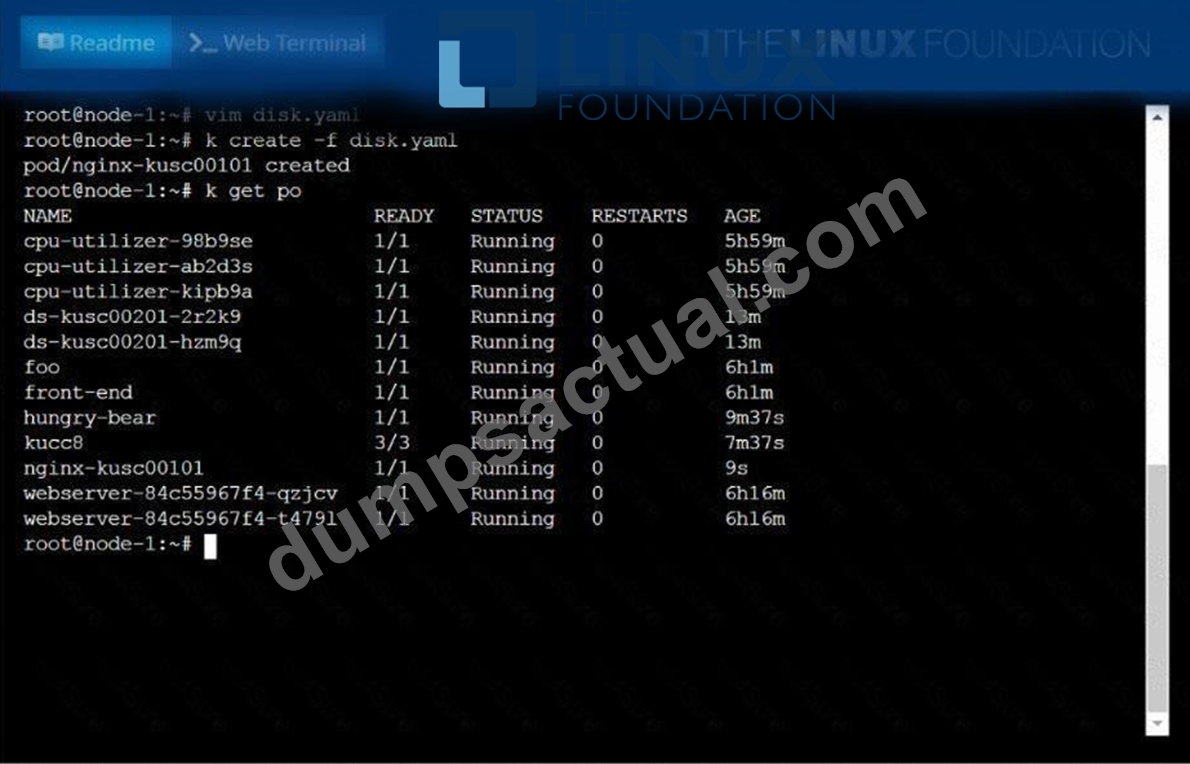
Schedule a pod as follows:
* Name: nginx-kusc00101
* Image: nginx
* Node selector: disk=ssd
Answer:
Explanation:
See the solution below.
Explanation
solution
NEW QUESTION 43
How can an administrator configure the NGFW to automatically quarantine a device using Global Protect?
- A. There is no native auto-quarantine feature so a custom script would need to be leveraged.
- B. by using security policies, log forwarding profiles, and log settings.
- C. by adding the device's Host ID to a quarantine list and configure GlobalProtect to prevent users from connecting to the GlobalProtect gateway from a quarantined device.
- D. by exporting the list of quarantined devices to a pdf or csv file by selecting PDF/CSV at the bottom of the Device Quarantine page and leveraging the appropriate XSOAR playbook.
Answer: C
NEW QUESTION 44
Create a Pod with main container busybox and which executes this
"while true; do echo 'Hi I am from Main container' >>
/var/log/index.html; sleep 5; done" and with sidecar container
with nginx image which exposes on port 80. Use emptyDir Volume
and mount this volume on path /var/log for busybox and on path
/usr/share/nginx/html for nginx container. Verify both containers
are running.
- A. // create an initial yaml file with this
kubectl run multi-cont-pod --image=busbox --restart=Never --
dry-run -o yaml > multi-container.yaml
// edit the yml as below and create it
kubectl create -f multi-container.yaml
vim multi-container.yaml
apiVersion: v1
kind: Pod
metadata:
labels:
run: multi-cont-pod
name: multi-cont-pod
spec:
volumes:
- name: var-logs
emptyDir: {}
containers:
- image: busybox
command: ["/bin/sh"]
args: ["-c", "while true; do echo 'Hi I am from Main
container' >> /var/log/index.html; sleep 5;done"]
name: main-container
volumeMounts:
- name: var-logs
mountPath: /var/log
- image: nginx
name: sidecar-container
ports:
- containerPort: 80
volumeMounts:
- name: var-logs
mountPath: /usr/share/nginx/html
restartPolicy: Never
// Create Pod
kubectl apply -f multi-container.yaml
//Verify
kubectl get pods - B. // create an initial yaml file with this
kubectl run multi-cont-pod --image=busbox --restart=Never --
dry-run -o yaml > multi-container.yaml
// edit the yml as below and create it
kubectl create -f multi-container.yaml
vim multi-container.yaml
apiVersion: v1
kind: Pod
metadata:
labels:
run: multi-cont-pod
name: multi-cont-pod
spec:
volumes:
- image: busybox
command: ["/bin/sh"]
args: ["-c", "while true; do echo 'Hi I am from Main
container' >> /var/log/index.html; sleep 5;done"]
name: main-container
volumeMounts:
- name: var-logs
mountPath: /var/log
- image: nginx
name: sidecar-container
ports:
mountPath: /usr/share/nginx/html
restartPolicy: Never
// Create Pod
kubectl apply -f multi-container.yaml
//Verify
kubectl get pods
Answer: A
NEW QUESTION 45
Create a deployment named "myapp" that having 2 replicas with
nginx image and expose deployment as service named "myservice"
- A. // Create a YAML Template
kubectl create deploy myapp --image=nginx --dry-run -o yaml >
myapp.yaml
//Update replicas=2 in myapp.yaml file
apiVersion: apps/v1
kind: Deployment
metadata:
labels:
app: myapp
name: myapp
spec:
replicas: 2
selector:
matchLabels:
app: myapp
template:
metadata:
labels:
app: myapp
spec:
containers:
- image: nginx
name: nginx
// Create deployment
kubectl create -f myapp.yaml
// Creating YAML template for service
kubectl expose deployment myapp --type=ClusterIP --port=60 --
target-port=60 --name=myservice --dry-run -o yaml >
myservice.yaml
YAML File:
apiVersion: v1
kind: Service
metadata:
labels:
app: myapp
name: myservice
spec:
ports:
- port: 60
protocol: TCP
targetPort: 80
selector:
app: myapp
type: ClusterIP
kubectl get svc
NAME TYPE CLUSTER-IP EXTERNAL-IP PORT(S)
AGE
kubernetes ClusterIP 10.2.0.1 <none> 443/TCP
158d
myservice ClusterIP 10.2.96.175 <none> 80/TCP
40s - B. // Create a YAML Template
kubectl create deploy myapp --image=nginx --dry-run -o yaml >
myapp.yaml
//Update replicas=2 in myapp.yaml file
apiVersion: apps/v1
kind: Deployment
metadata:
labels:
app: myapp
name: myapp
spec:
replicas: 2
selector:
matchLabels:
app: myapp
template:
metadata:
labels:
app: myapp
spec:
containers:
- image: nginx
name: nginx
// Create deployment
kubectl create -f myapp.yaml
// Creating YAML template for service
kubectl expose deployment myapp --type=ClusterIP --port=80 --
target-port=80 --name=myservice --dry-run -o yaml >
myservice.yaml
YAML File:
apiVersion: v1
kind: Service
metadata:
labels:
app: myapp
name: myservice
spec:
ports:
- port: 80
protocol: TCP
targetPort: 80
selector:
app: myapp
type: ClusterIP
kubectl get svc
NAME TYPE CLUSTER-IP EXTERNAL-IP PORT(S)
AGE
kubernetes ClusterIP 10.2.0.1 <none> 443/TCP
158d
myservice ClusterIP 10.2.96.175 <none> 80/TCP
40s
Answer: B
NEW QUESTION 46
Create a pod as follows:
* Name:non-persistent-redis
* container Image:redis
* Volume with name:cache-control
* Mount path:/data/redis
The pod should launch in thestagingnamespace and the volumemust notbe persistent.
Answer:
Explanation:
See the solution below.
Explanation
solution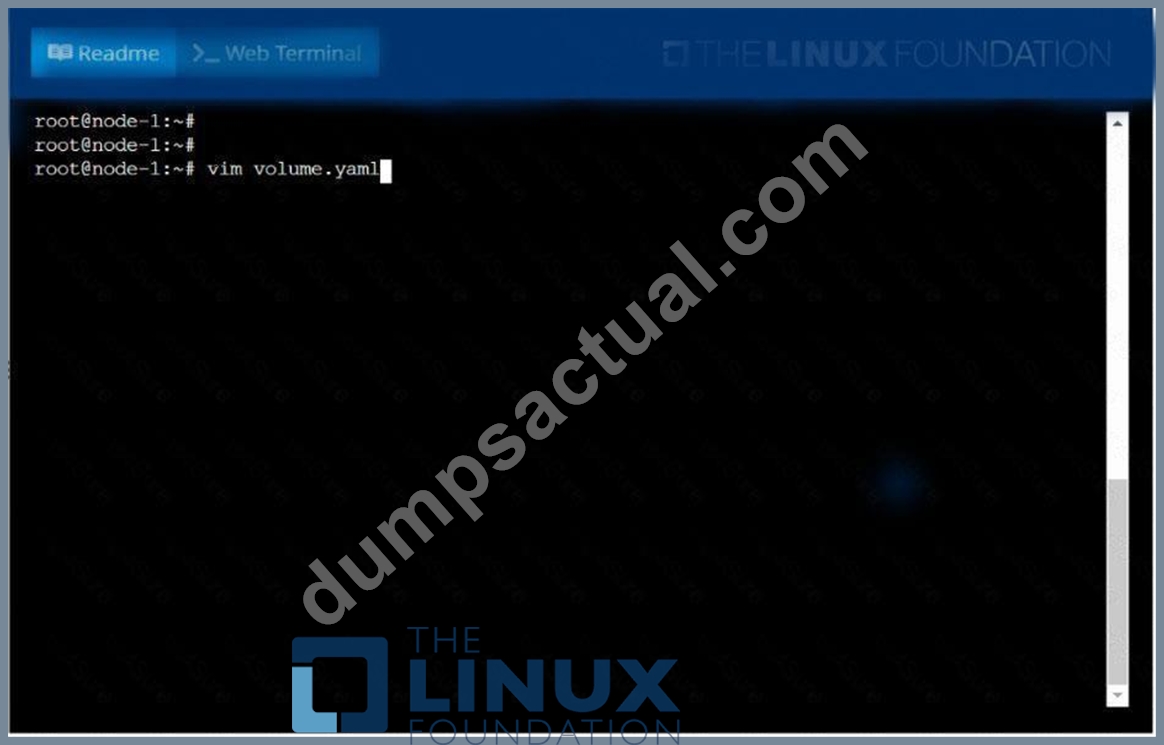
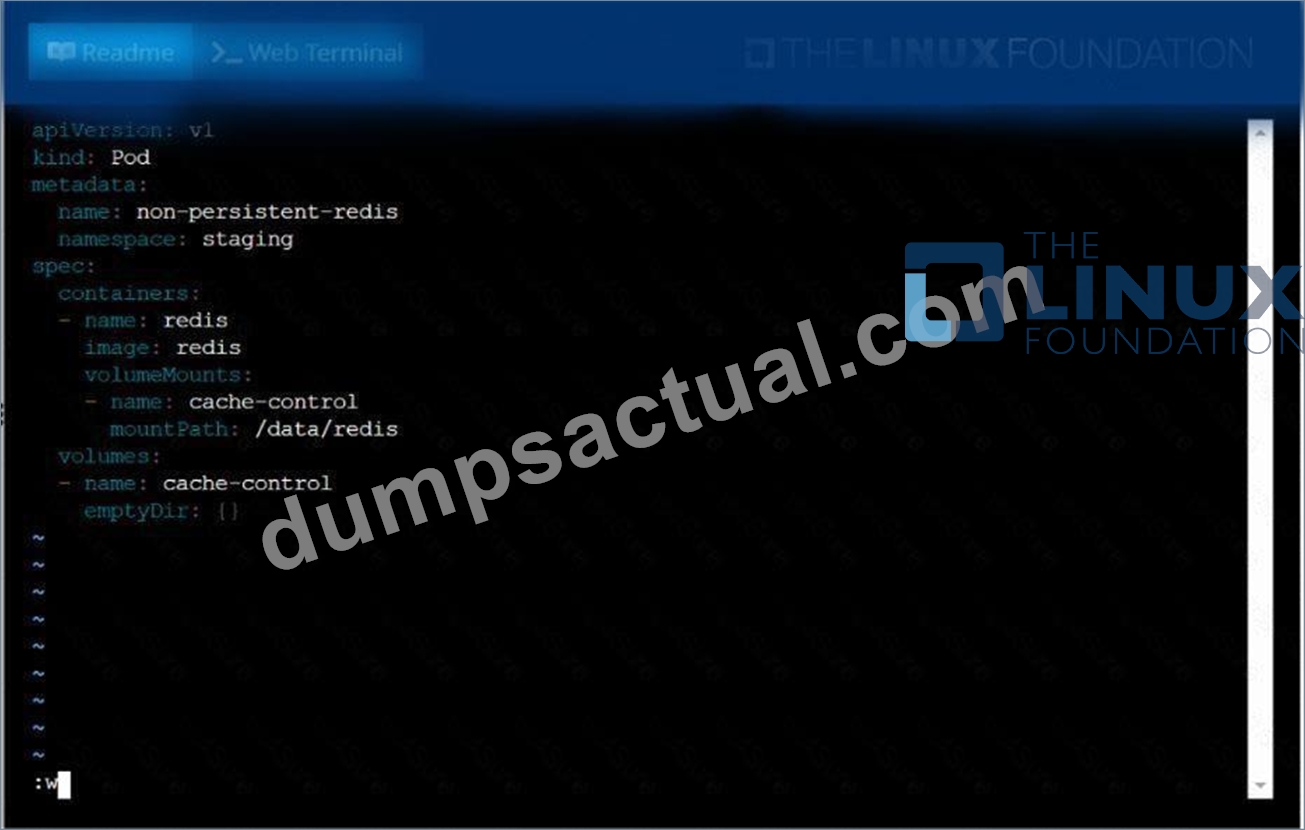
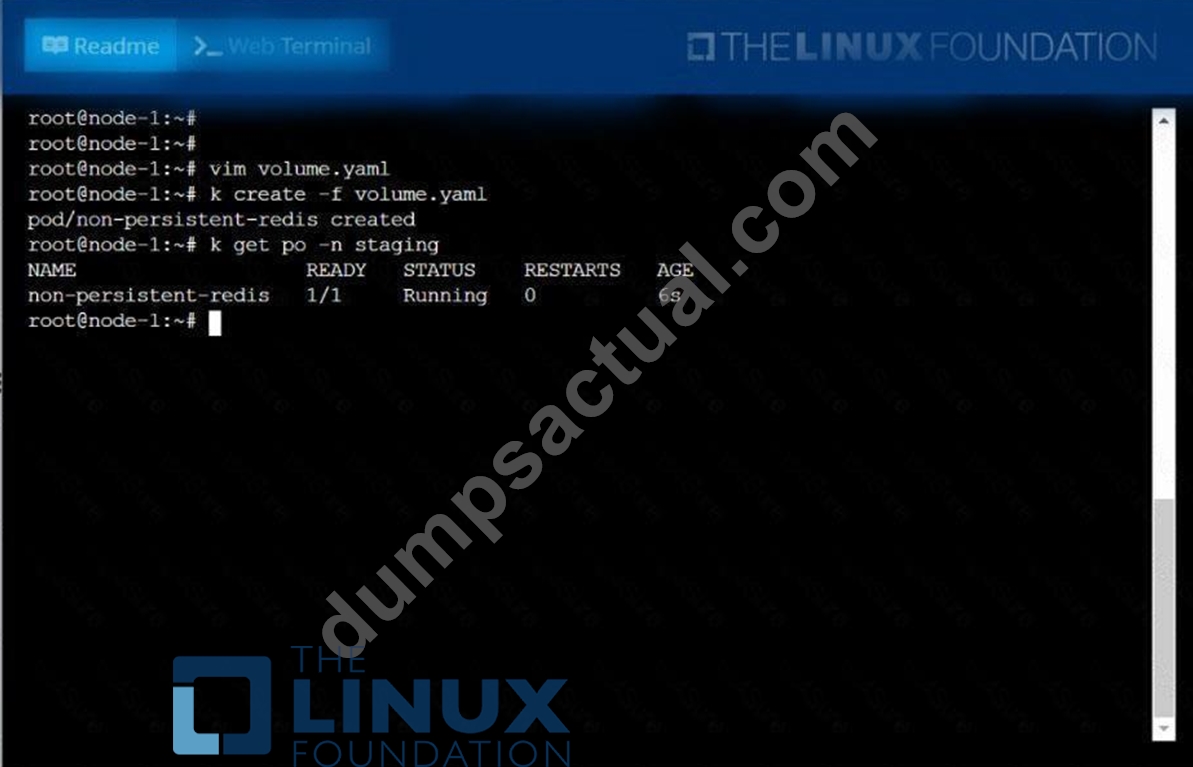
NEW QUESTION 47
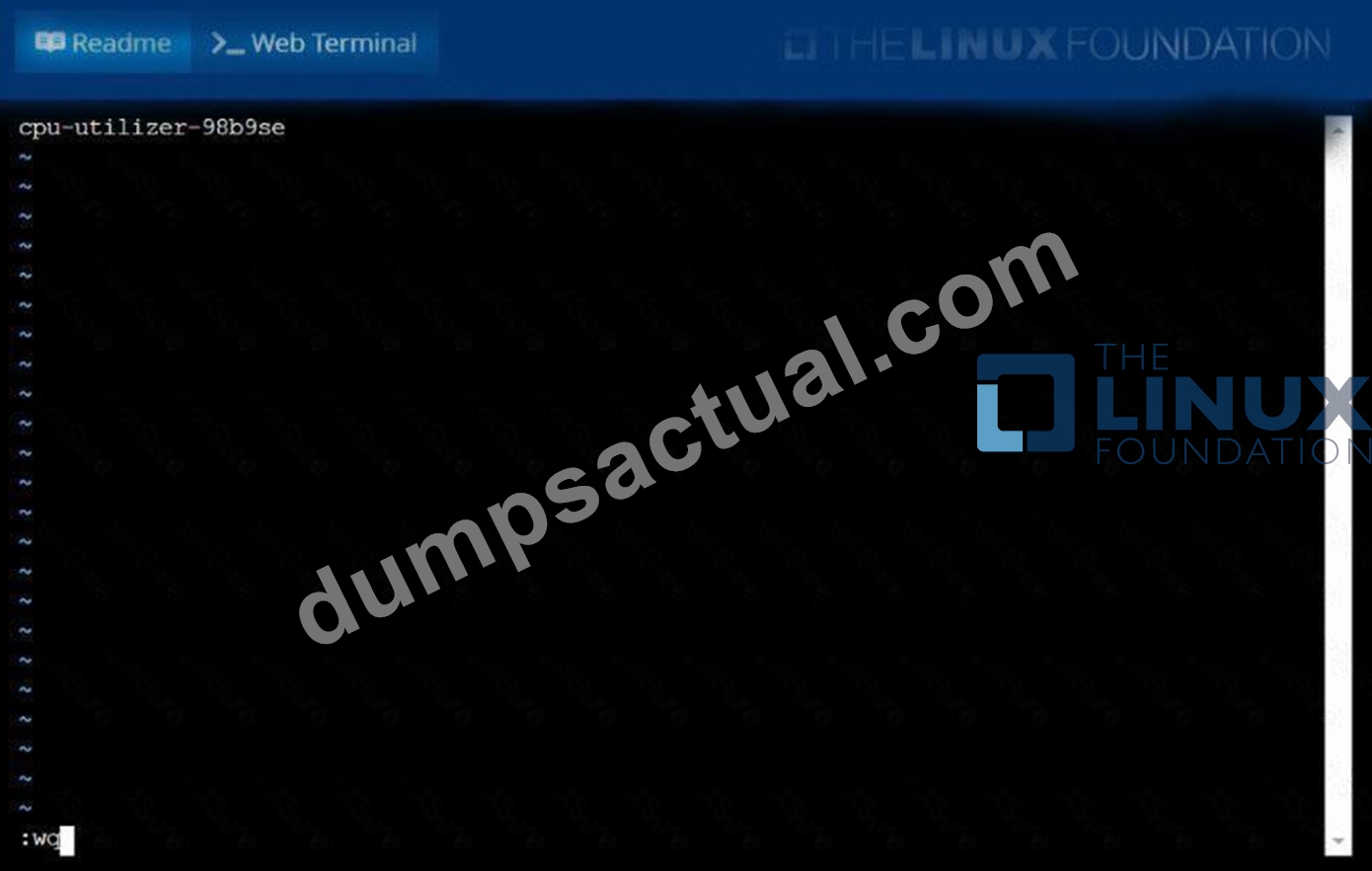
From the pod labelname=cpu-utilizer, find podsrunning high CPU workloads and write the name of the pod consumingmost CPU to thefile/opt/KUTR00102/KUTR00102.txt(which already exists).
Answer:
Explanation:
See the solution below.
Explanation
solution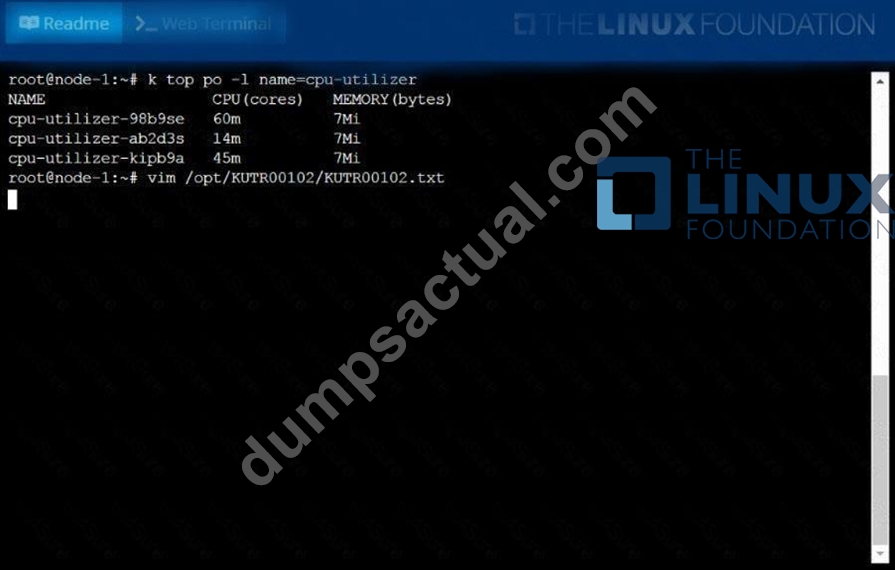
NEW QUESTION 48
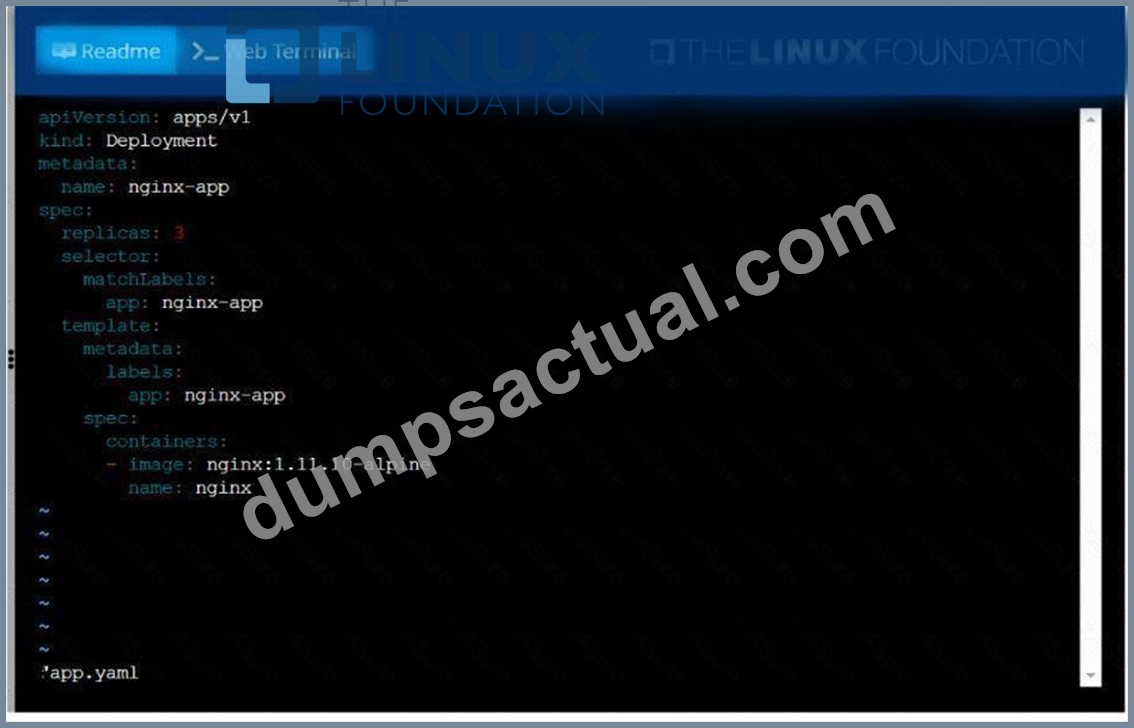
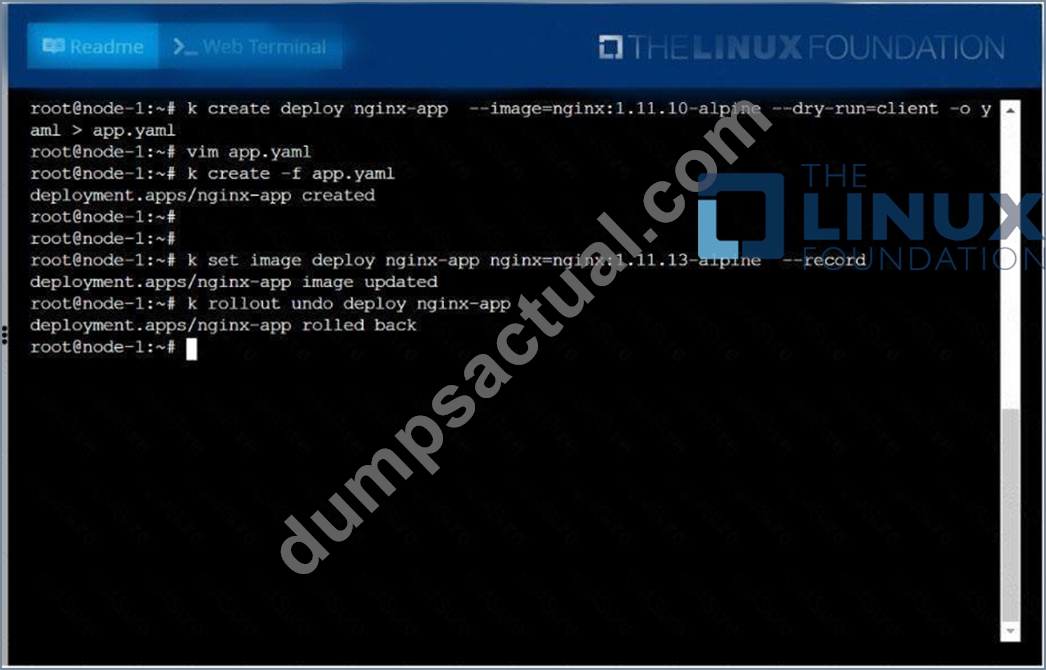
Create a deployment as follows:
* Name:nginx-app
* Using containernginxwithversion 1.11.10-alpine
* The deployment should contain3replicas
Next, deploy the application with newversion1.11.13-alpine, byperforming a rolling update.
Finally, rollback that update to theprevious version1.11.10-alpine.
Answer:
Explanation:
See the solution below.
Explanation
solution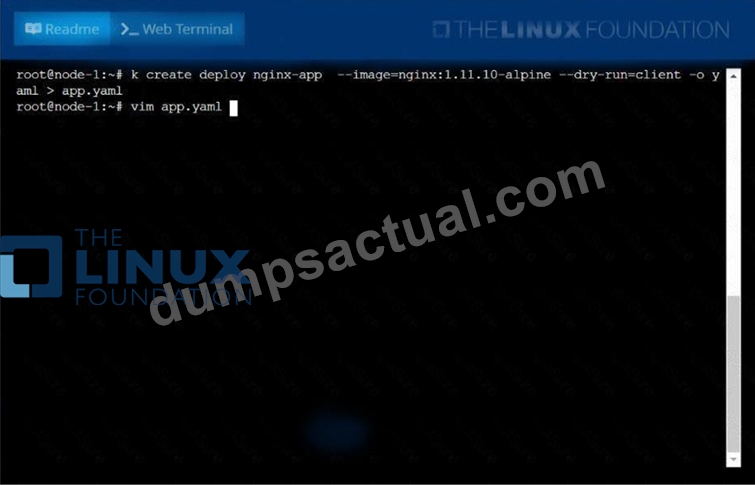
NEW QUESTION 49
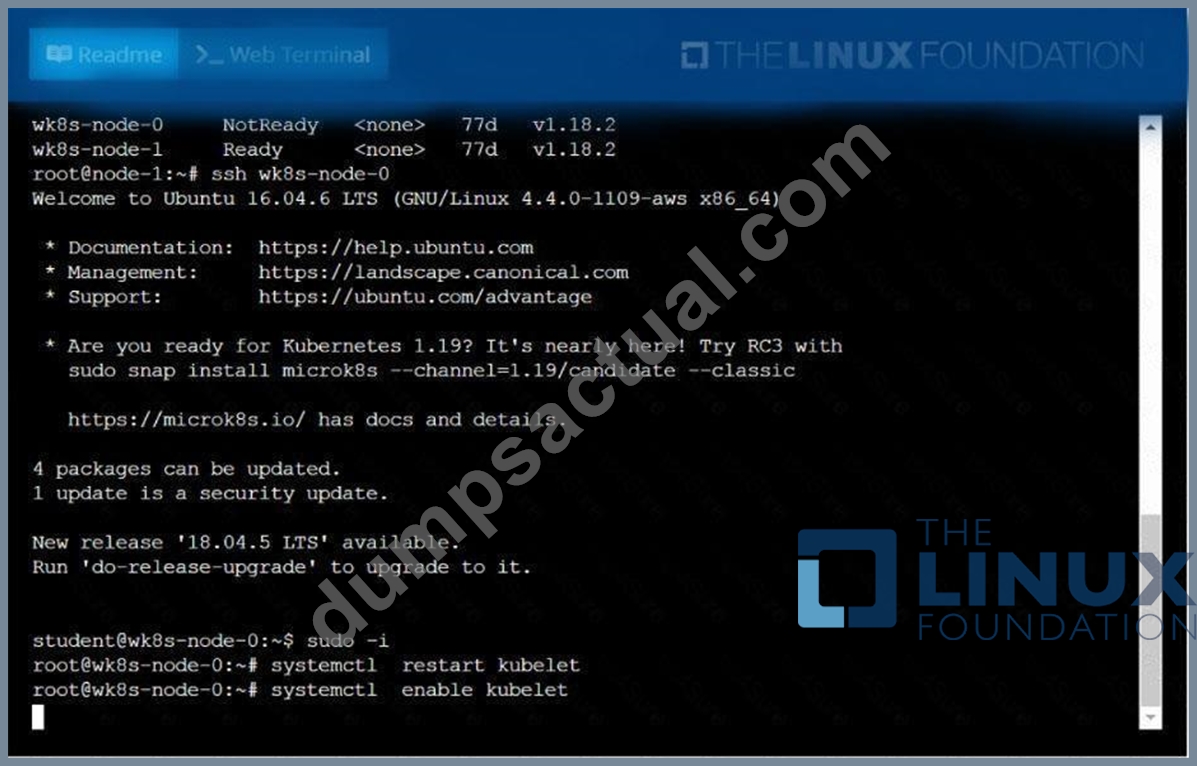
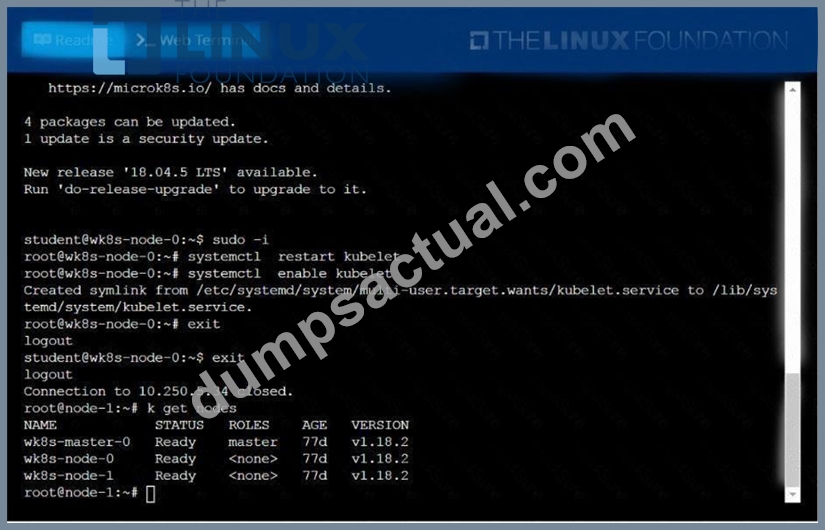
A Kubernetes worker node, named .Investigate why this is the case,
andperform any appropriate steps tobring the node to a state,ensuring that any changes are madepermanent.
You cansshto the failednode using:
[student@node-1] $ | sshWk8s-node-0
You can assume elevatedprivileges on the node with thefollowing command:
[student@w8ks-node-0] $ |sudo -i
Answer:
Explanation:
See the solution below.
Explanation
solution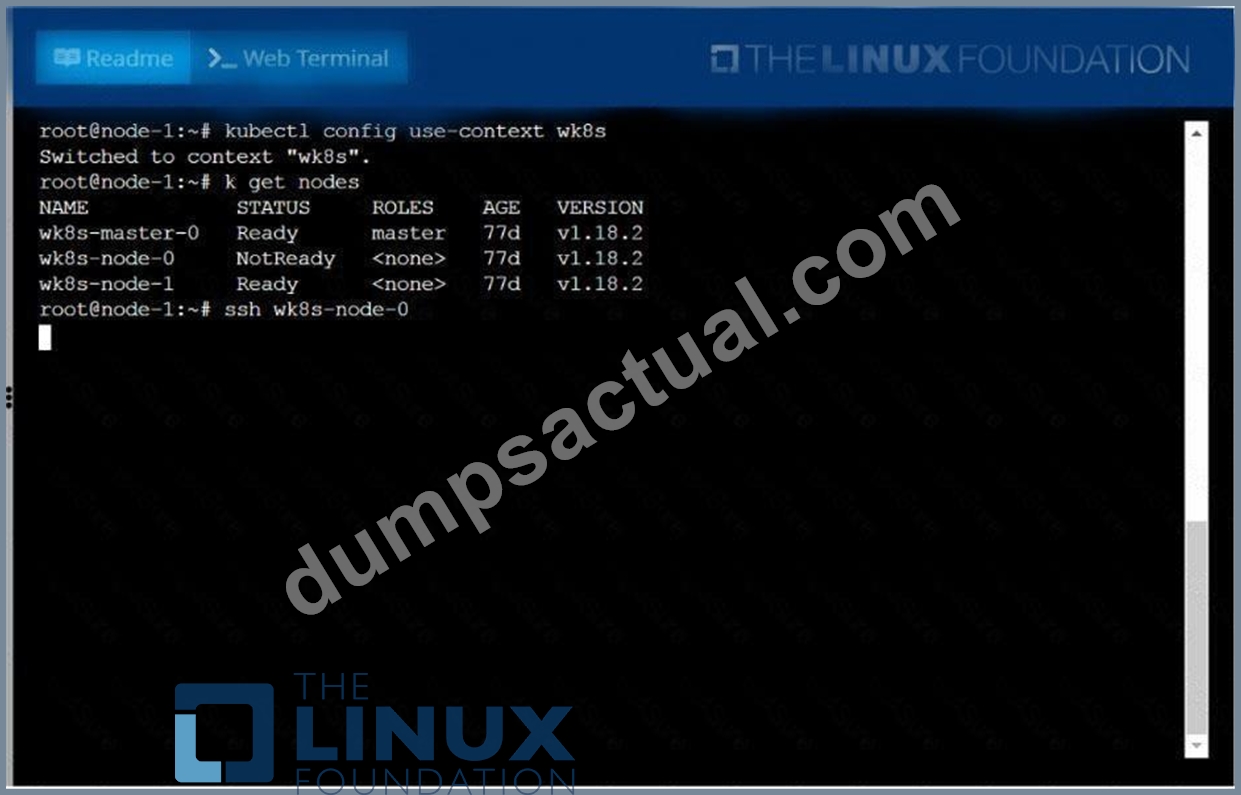
NEW QUESTION 50
Create a Job with an image node which prints node version and
verifies there is a pod created for this job
- A. kubectl create job nodeversion --image=node -- node -v
kubectl get job -w
kubectl get pod
YAML File:
apiVersion: batch/v1
kind: Job
metadata:
labels:
job-name: nodeversion
name: nodeversion
spec:
completions: 1
parallelism: 1
labels:
job-name: nodeversion
spec:
containers:
- command:
- node
- -v
image: node
imagePullPolicy: Always
name: nodeversion
restartPolicy: Never - B. kubectl create job nodeversion --image=node -- node -v
kubectl get job -w
kubectl get pod
YAML File:
apiVersion: batch/v1
kind: Job
metadata:
labels:
job-name: nodeversion
name: nodeversion
spec:
completions: 1
parallelism: 1
selector:
matchLabels:
job-name: nodeversion
template:
metadata:
labels:
job-name: nodeversion
spec:
containers:
- command:
- node
- -v
image: node
imagePullPolicy: Always
name: nodeversion
restartPolicy: Never
Answer: B
NEW QUESTION 51
Create and configure the servicefront-end-serviceso it's accessiblethroughNodePortand routes to theexisting pod namedfront-end.
Answer:
Explanation:
See the solution below.
Explanation
solution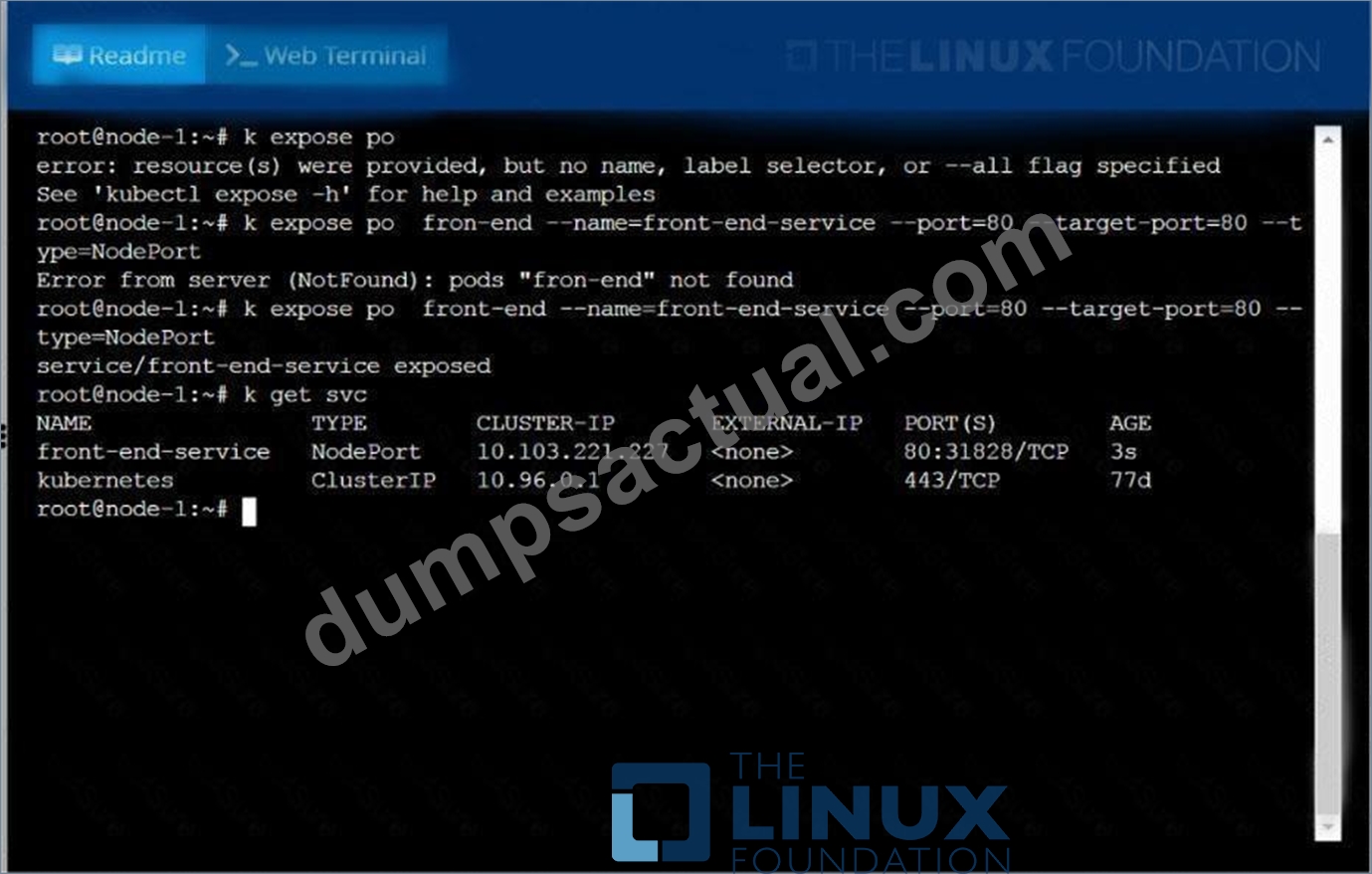
NEW QUESTION 52
Create a nginx pod that will be deployed to node with the label
"gpu=true"
- A. kubectl run nginx --image=nginx --restart=Always --dry-run -o
yaml > nodeselector-pod.yaml
// add the nodeSelector like below and create the pod
kubectl apply -f nodeselector-pod.yaml
vim nodeselector-pod.yaml
apiVersion: v1
kind: Pod
metadata:
name: nginx
spec:
nodeSelector:
gpu: true
yaml
//Verify
kubectl get no -show-labels
kubectl get po
kubectl describe po nginx | grep Node-Selectors - B. kubectl run nginx --image=nginx --restart=Always --dry-run -o
yaml > nodeselector-pod.yaml
// add the nodeSelector like below and create the pod
kubectl apply -f nodeselector-pod.yaml
vim nodeselector-pod.yaml
apiVersion: v1
kind: Pod
metadata:
name: nginx
spec:
nodeSelector:
gpu: true
containers:
- image: nginx
name: nginx
restartPolicy: Always
kubectl apply -f nodeselector-pod.yaml
//Verify
kubectl get no -show-labels
kubectl get po
kubectl describe po nginx | grep Node-Selectors
Answer: B
NEW QUESTION 53
Add a taint to node "worker-2" with effect as "NoSchedule" and
list the node with taint effect as "NoSchedule"
- A. // Add taint to node "worker-2"
kubectl taint nodes worker-2 key=value:NoSchedule
.items[*]}{.metadata.name} {.spec.taints[?(
@.effect=='NoSchedule' )].effect}{\"\n\"}{end}" | awk 'NF==2
{print $0}' - B. // Add taint to node "worker-2"
kubectl taint nodes worker-2 key=value:NoSchedule
// Verify
// Using "custom-coloumns" , you can customize which coloumn to
be printed
kubectl get nodes -o customcolumns=NAME:.metadata.name,TAINTS:.spec.taints --no-headers
// Using jsonpath
kubectl get nodes -o jsonpath="{range
.items[*]}{.metadata.name} {.spec.taints[?(
@.effect=='NoSchedule' )].effect}{\"\n\"}{end}" | awk 'NF==2
{print $0}'
Answer: B
NEW QUESTION 54
List all the pods that are serviced by the service "webservice" and copy the output in /opt/$USER/webservice.targets Note: You need to list the endpoints
Answer:
Explanation:
kubectl descrive svc webservice | grep -i "Endpoints" > /opt/$USER/webservice.targets kubectl get endpoints webservice > /opt/$USER/webservice.targets
NEW QUESTION 55
Check logs of each container that "busyboxpod-{1,2,3}"
- A. kubectl logs busybox -c busybox-container-1
kubectl logs busybox -c busybox-container-2
kubectl logs busybox -c busybox-container-3 - B. kubectl logs busybox -c busybox-container-1
kubectl logs busybox -c busybox-container-3
kubectl logs busybox -c busybox-container-3
Answer: A
NEW QUESTION 56
......
Ultimate Guide to the CKA - Latest Edition Available Now: https://www.dumpsactual.com/CKA-actualtests-dumps.html
2022 Updated Verified Pass CKA Study Guides & Best Courses: https://drive.google.com/open?id=1LTOjz6xkSAivKi_Ik-i8tQ0SYm-_kBpT
